Configuring Auto Failover
Use the Auto-failover page of the CygNet Redundancy Editor to configure the failover triggers that will be used to initiate an automatic failover for services on the active domain.
Standby RSM(s) in both a local and data-center role will monitor active RSM(s) for failure. If one or more active RSMs become unavailable, the standby RSM will initiate a failover. The Failover trigger is configured on this page, and associated with a domain on the Domain page of the CygNet Redundancy Editor. You cannot associate a trigger condition with an active domain.
A test mode is also available to help verify the configured trigger settings.
|
Click the thumbnail to see an example |
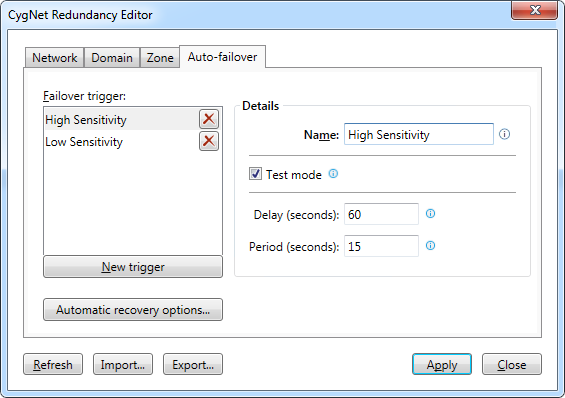
Auto-failover Trigger Properties
The following table lists and describes the Auto-failover page properties.
| Parameter | Description |
|---|---|
| Failover trigger | |
|
New trigger |
Click New trigger to configure a new failover trigger. Click X to remove the associated row. |
| Details | |
|
Name |
Specify a unique name for the failover trigger (20 characters or less). |
|
Test mode |
Click to indicate that this trigger is in test mode only. When in test mode, if the failover trigger conditions are met, then a message is logged to the service log file instead of initiating a failover. This can be used to verify your failover conditions. |
|
Delay (seconds) |
Specify the amount of time (in seconds, decimals allowed) to wait before a failover will be initiated. Once the failover conditions are first met, the failover will be delayed by this amount of time to verify the conditions remain. If the failover conditions revert during this time, then the trigger will be reset and no failover will be initiated. |
|
Period (seconds) |
Specify the frequency (in seconds, decimals allowed) at which the failover trigger conditions will be checked. |
|
Automatic recovery options |
Click Automatic recovery options to view and/or update the Automatic service recovery options for all the redundant RSMs in the redundancy environment. See Configuring Automatic Service Recovery for more information. |
More:


